
Voice & Transcribe - QuickVox
B1 Group OUProductivity
4.452.00 Reviews
- Version
- 1.0.73
- Installs
- 100.00K
- Age Rating
- Everyone
Screenshots
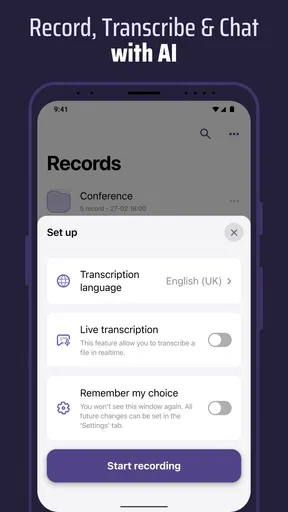
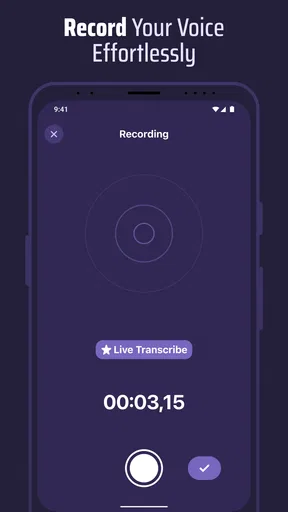
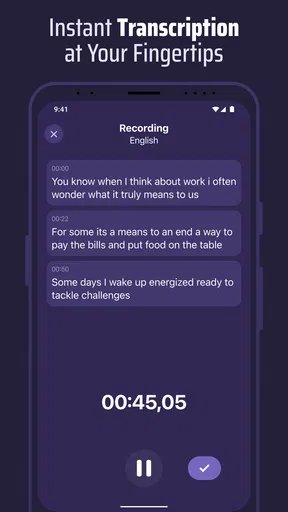
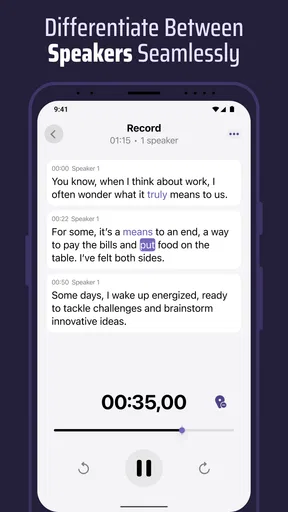
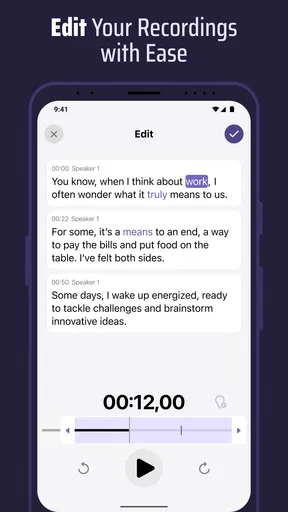
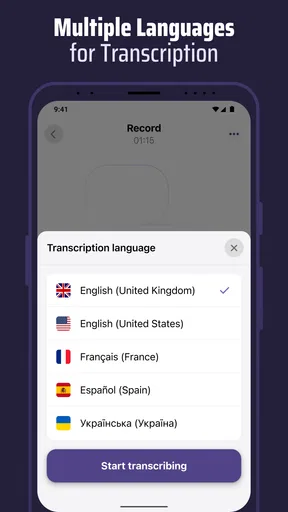
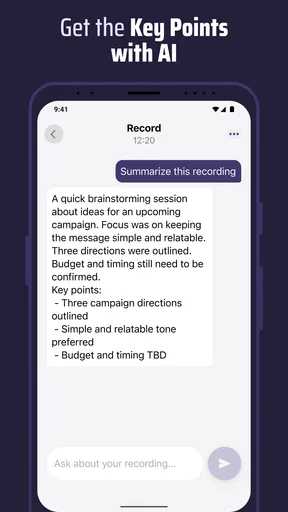
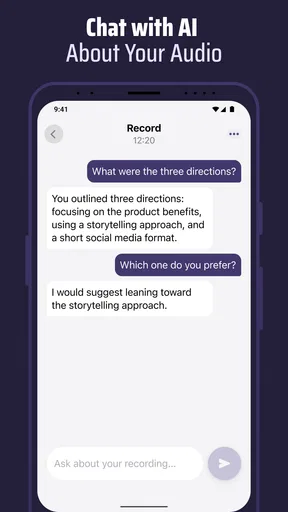
Our Review of Voice & Transcribe - QuickVox
 Analysis by Appyee
I spent time with Voice & Transcribe - QuickVox as a practical productivity tool rather than treating it as just another voice recorder. Its appeal is easy to understand: it brings live transcription, recording, and speaker recognition into one place, so I can move from spoken conversation to readable notes without switching between several apps. That combination feels especially useful on a phone, where every extra step matters.
The app is made by B1 Group OU and is available free of charge, with optional purchases shown from $3.99 to $69.99 per item. It is rated for Everyone, runs on Android 7.0 and newer, and the current release is version 1.0.73. The public response is encouraging, with a 4.4 average from roughly 750 ratings, while its install count has passed 100K. Those figures suggest a growing audience, but my recommendation is based more on how well its workflow fits real situations than on popularity alone.
How QuickVox handles connected, mobile work
I find connected mobile work most useful when the conversation has to keep moving and I can’t stop to type, but the handoff from spoken words to a finished note still takes judgment. I’d decide before starting what needs to leave the transcript—perhaps a few action items or a summary—so the recording stays a source to review rather than a document I share without checking.
Why the network can shape the experience
The first thing I would tell a new user is that a transcription app should be judged in the places where speech actually happens: moving between appointments, sitting in a busy room, recording a quick idea, or trying to keep up with a discussion. In those moments, connectivity becomes part of the experience. A live transcription tool may need communication with its processing service, and that means the quality of the connection can influence how quickly words appear and how confident I feel while relying on the text.
I do not treat the transcript as instantly final while someone is still speaking. Live text is useful because it gives me a running view of the conversation, but I still listen to the recording when a sentence matters. This is an important habit with any speech-to-text application: the displayed wording helps me follow the discussion, while the audio remains the safer reference for names, figures, technical terms, and sentences spoken over background noise.
QuickVox is at its best when I have a stable connection and a clear reason to capture speech immediately. For example, after a meeting, I can use the recording and transcript together instead of trying to reconstruct the discussion from memory. The speaker-recognition element adds another layer of usefulness in conversations involving several people, because a transcript divided by voices is easier to review than one long block of text.
That does not mean I would use it as the only record for a sensitive interview, legal discussion, medical appointment, or formal business decision. Recognition can be affected by interruptions, similar voices, distance from the microphone, and people talking at the same time. I see it as a sorting and review aid, not as a replacement for checking the original recording.
A realistic day with the app
Imagine I am leaving a client meeting with several tasks in my head. Instead of opening a notes app and trying to remember every action point, I can start a recording while the conversation is still fresh, let the spoken content become text, and later scan for the parts that need follow-up. The useful detail here is not simply that speech becomes words. It is that the recording, transcription, and speaker context can support different stages of the same task.
During the meeting, I would focus on keeping the phone positioned where voices are reasonably clear and avoiding the temptation to stare at the screen. Immediately afterward, I would review names and commitments against the audio. Later, I could turn the transcript into a short checklist in my usual notes or task app. This workflow reduces typing at the moment when attention should remain on the people in the room.
For a student, the same approach can work during a revision discussion or a personal explanation of a difficult topic. For a journalist or researcher, it can provide a first pass through a long conversation. For someone who thinks aloud, it can turn spoken ideas into material that is easier to edit. The strongest benefit is therefore not limited to one profession; it is the reduction of friction between speaking and organizing information.
What changes when I am away from reliable service
Connectivity matters most when I need the result immediately. In a strong signal area, live text can help me notice whether the app is keeping up. In a weak or interrupted connection, I would be more cautious about assuming that every word has been processed correctly at once. I would record only when the conversation is worth preserving and leave enough time afterward to check what was captured.
This is also why I would not make QuickVox my sole method for capturing an urgent instruction in a place where the connection is unpredictable. A simple handwritten note or a basic recorder may be the better backup for that particular moment. The usual alternative is less clever, but it is often more dependable when the priority is merely preserving sound or a short reminder rather than producing searchable text.
When I know I will be moving through areas with inconsistent service, I would prepare a fallback routine before starting. I might keep a short text note open for essential names and numbers, say key details aloud twice, or make a separate manual reminder after the conversation. These are small measures, but they prevent a connectivity problem from becoming a memory problem.
Recovering from interruptions and imperfect transcripts
A useful way to work with QuickVox is to treat a session as a draft that can be checked, not as a finished document that needs no attention. If the live text pauses or appears incomplete, I would avoid stopping the conversation just to chase the display. The recording is more valuable than a perfectly continuous screen. I would let the discussion continue, then return to the unclear section afterward.
Speaker recognition deserves the same practical caution. It can make a multi-person transcript easier to navigate, but I would not assume that every change of voice will be identified perfectly in a lively conversation. If two people interrupt each other or one speaker is far from the phone, labels may need human interpretation. That is not a reason to dismiss the feature; it is a reason to use it as an organizing layer rather than unquestioned evidence.
My preferred recovery method is simple. First, preserve the original recording. Second, mark the parts of the transcript that look suspicious, such as unusual names or abrupt sentence changes. Third, replay only those sections instead of listening to everything from the beginning. This turns a potentially frustrating review into a targeted correction job and is one of the more effective ways to save time with any transcription workflow.
I would also avoid renaming or reorganizing important material until I had checked that the session was captured as expected. That is a general mobile habit, but it matters here because the value of the app comes from keeping spoken material available for later review. If I am recording a one-time conversation, I want to confirm the result before moving on to another task.
Using it carefully on mobile data
Because live transcription can involve more than simply saving an audio file, I would be mindful of when and where I use it. On a home or office connection, a long discussion is easier to justify than during a long journey on mobile data. I would also avoid starting a lengthy session casually if I have limited battery or a weak signal, because a phone is doing several jobs at once: capturing audio, maintaining the app, and presenting or processing text.
For short voice notes, the convenience is compelling. I can speak an idea while walking, then revisit it as text instead of trying to type with one hand. For extended recordings, I would plan the session: keep the phone steady, reduce unnecessary apps, and leave enough time for review. These steps are not glamorous, but they make the difference between a useful transcript and a hurried capture that needs more work than the original task.
Privacy is another reason to be selective. I would not record people without making sure the situation allows it, and I would be especially careful with confidential conversations. The presence of transcription and speaker recognition means the output may reveal more structure than a raw audio file, particularly when several participants are involved. QuickVox can help organize information, but that convenience should not override consent or sensible handling of personal material.
For data-conscious users, the best approach is to use the app for moments where searchable text genuinely saves time. A two-second reminder may be faster to type manually. A long planning conversation, interview, or study session is where transcription earns its place. This distinction keeps the app from becoming an automatic recorder for everything and makes its strongest features feel intentional rather than excessive.
How it compares with familiar alternatives
A standard voice recorder remains the better choice when I only need a dependable audio reference and do not care about reading or searching the conversation. It is simpler, and simplicity can be valuable when service is uncertain or the recording itself is the priority. A notes app wins when the information is already clear enough to type, especially for a short shopping list or a quick task.
Dedicated transcription services may be preferable for users who need highly specialized editing, extensive export options, or a workflow built around professional transcripts. QuickVox is more appealing when I want a compact mobile tool that combines the initial capture with readable text and speaker context. Its advantage is convenience across the whole first step, not necessarily replacing every specialist tool afterward.
There is also a meaningful difference between dictation and conversation transcription. Dictation is controlled: one person speaks clearly, pauses, and corrects mistakes. A group discussion is messy, with overlap and changing speakers. QuickVox’s broader design makes it more suitable for the latter than a basic keyboard microphone, but I would still expect to edit the result before sharing it as polished notes.
Who will benefit most, and who should pass
I would recommend it to students, meeting-heavy workers, researchers, content creators, and anyone who regularly has useful thoughts while their hands are occupied. It is particularly attractive to people who dislike typing on a small screen but still need a written version of what they said or heard. The free entry point makes it easy to test whether the workflow fits before considering optional purchases.
I would be more cautious if I needed guaranteed operation in places with unreliable connectivity, exact transcripts with no review, or a narrowly specialized professional editing system. Someone who records only occasional short reminders may find a basic recorder or notes app less distracting. Likewise, users who are uncomfortable recording group conversations should not feel pressured to use speaker recognition simply because it is available.
The age rating of Everyone makes the app broadly approachable, but that does not remove the need for adult judgment around consent and sensitive material. The right audience is not defined only by age; it is defined by whether the person has a real use for converting speech into organized information.
My verdict on QuickVox
Voice & Transcribe - QuickVox is a convincing productivity app when I need to capture spoken material quickly and make sense of it later. Its combination of live text, recording, and speaker recognition gives it a clearer purpose than a plain recorder, especially for meetings, study conversations, interviews, and hands-free idea capture. The experience is strongest when I have a reliable connection, reasonable audio clarity, and time to review important passages.
The main trade-off is that convenience does not eliminate checking. Connectivity can affect immediacy, recognition can misread a lively group, and a transcript should not automatically be treated as a perfect document. Once I accept those limits, the app becomes easier to use well: preserve the audio, verify critical details, and choose it for conversations where searchable text will genuinely save effort.
My practical recommendation is to use QuickVox as a connected capture-and-review tool, not as an unquestioned replacement for notes, recording backups, or human editing. That makes it a good fit for people who want one mobile starting point for spoken information. With over 100K installs and a solid 4.4 average, it has already attracted meaningful interest, but its real value depends on matching the app to the situation. When the network is dependable and the conversation matters, it can turn a difficult typing task into a manageable review process.
In my experience, that balance is what makes Voice & Transcribe - QuickVox worth trying. I would install it for meetings, research, study, and ideas that arrive too quickly to type. I would skip it for a critical offline-only task or a recording that cannot tolerate any uncertainty without careful verification. Used with that distinction in mind, it is a useful addition to a mobile productivity toolkit rather than a one-tap solution to every transcription problem.
Verdict
Strengths of Voice & Transcribe - QuickVox
- Quickly converts spoken words into editable text.
- Useful for drafting messages, notes, and meeting summaries.
- Simple interface makes core transcription features easy to find.
- Supports hands-free note-taking when typing is inconvenient.
- Can help improve productivity for users who dictate frequently.
Limitations of Voice & Transcribe - QuickVox
- Accuracy may drop with background noise or unclear pronunciation.
- Some features may require a subscription or in-app purchase.
- Transcription quality can vary between languages and accents.
- Long recordings may take more time to process or use more data.
- Voice recordings and transcripts may raise privacy concerns for some users.
Similar Picks in This Category
View All
Google Calendar
Google LLC4.6

Google Drive
Google LLC4.3

Google Assistant
Google LLC3.9

Microsoft OneDrive
Microsoft Corporation4.6

Samsung Calendar
Samsung Electronics Co., Ltd.4.1

Microsoft OneNote: Save Notes
Microsoft Corporation4.6
Frequently Asked Questions
What is Voice & Transcribe - QuickVox used for?
Voice & Transcribe - QuickVox is designed to turn spoken words into written text quickly. It can be useful for creating notes, drafting messages, recording ideas, transcribing conversations, or preparing text without typing everything manually. Its main appeal is convenience for users who want a simple voice-to-text tool, although the final accuracy may depend on pronunciation, background noise, language settings, and the quality of the device microphone.
How accurate is QuickVox when converting speech to text?
QuickVox can provide useful transcriptions for clear speech, especially when you speak at a moderate pace and use a quiet environment. However, it should not be treated as perfectly accurate. Strong accents, technical terms, overlapping voices, music, poor microphone quality, and background noise may lead to mistakes. It is a good idea to review the generated text before sharing it, publishing it, or using it for important personal or professional documents.
Does Voice & Transcribe - QuickVox support different languages?
Language availability can depend on the version of QuickVox, the operating system, and the speech-recognition services used by the app. Before downloading, users should check the current app-store description and settings to confirm that their preferred language or dialect is supported. Even when a language is available, recognition quality may vary, so testing a short recording is recommended before relying on the app for frequent or lengthy transcription work.
Is QuickVox free to download and use?
Voice & Transcribe - QuickVox may be available to download at no initial cost, but users should carefully review the app-store listing for possible advertisements, premium features, subscriptions, usage limits, or in-app purchases. Free access does not always mean that every transcription or export option is included. Checking the pricing details, trial terms, renewal conditions, and cancellation instructions before starting a subscription can help prevent unexpected charges.
Is my voice or transcribed text private when using QuickVox?
Privacy is an important consideration because voice transcription may require audio or text to be processed on the device or sent to online servers. Before using QuickVox for confidential conversations, work documents, medical information, or personal data, read its current privacy policy and review the permissions requested by the app. Avoid recording other people without their knowledge or consent, and delete sensitive recordings or transcripts when they are no longer needed.
